How to FIX ERR_CERTIFICATE_TRANSPARENCY_REQUIRED
-
The most common issue in receiving the error ERR_CERTIFICATE_TRANSPARENCY_REQUIRED in Chrome browser is a problem with CT logs, as SSL is corrupted, misconfigured or expired. A Certificate Transparency (CT) requires each certificate to be properly logged.
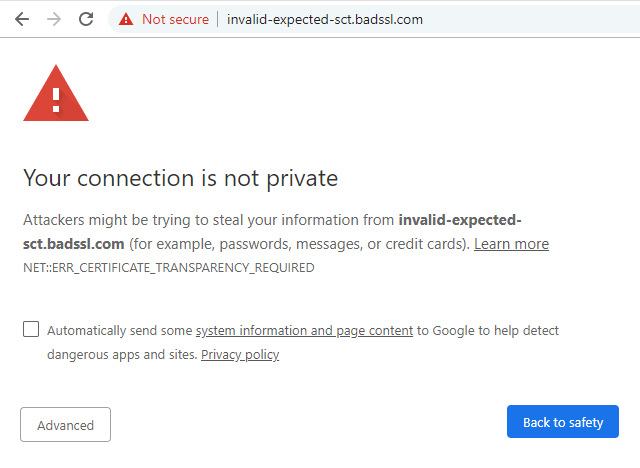
A bit of theory, CT is an Internet Security standard and now a requirement for all trusted Certificate Authorities (CA). The CA must add any issued/reissued SSL certificate to CT logs, best practises suggests adding it to multiple logs. The logs operate as an industry safeguards again misissuance. It is a mandatory industry requirement. No valid log for issue SSL would trigger the browser to show error below:
-
-
1
Solution for Website owners
Urgently contact your CA or a company who sold your SSL certificate and request them to add your website (domain name) to the CT logs. Change the CA if they fail to resolve the issue quickly. Leading CAs do not face issues like that in most cases and respect the CT rules.
-
2
Solution for Website visitors
- The route cause should be eliminated by the website owner and their certificate authority. The best thing you can do is contacting the website owner and letting him know about the faced issue
- Update Chrome browser to the latest version to avoid issues related to old software. It is very easy to do, just type chrome://help/ in the address bar and press Enter. The Chrome itself will check its relevance and download the latest updates; Alternative way to update - click on the three vertically placed dots in the upper right corner, go to the "About the program" in the window that appears - the browser will indicate the version number and update.
-
Avoid next steps
We highly suggest avoiding the next solutions published online to solve the issue for website visitors.
- Do not turn off Antivirus or Firewall;
- Do not avoid Browser warning by visiting website;
-
Conclusion
- Webmasters: Web site owners should urgently resolve the issue by contacting CA.
- Visitors: The error is critical and enough to avoid using the website.
-