How to FIX ERR_SSL_PINNED_KEY_NOT_IN_CERT_CHAIN
-
Usage of "Public Key Pinning" may bring difficulties and your say may stop opening in Chrome browser. Usually, that happens after the renewal of an SSL certificate. In this case, the time chosen by the administrator could exceed the time of expiration of the certificate, or its renewal.
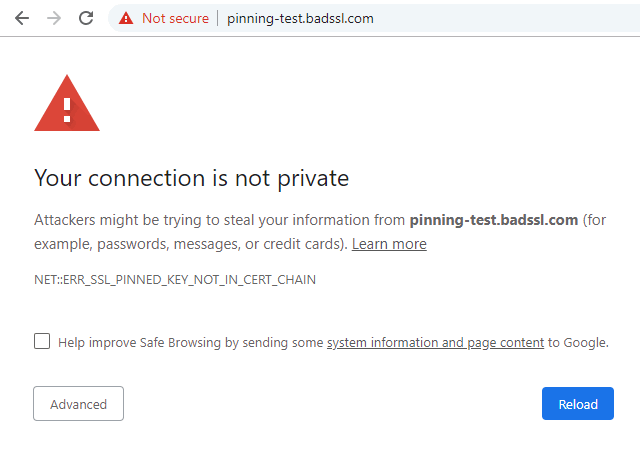
As a result, the visitor of the website would receive error NET::ERR_SSL_PINNED_KEY_NOT_IN_CERT_CHAIN like on the screenshot below.
HSTS is HTTPS Strict Transport Security. This setting forces the browser to always use HTTPS for a particular site. This is done with special instructions from the web server that serves the site. As an additional layer of security, HPKP - HTTP Public Key Pinning can be used. This setting allows the webmaster to specify which public key associated with the SSL certificate is good. The visitor browser will save these parameters for the time specified in the web server settings.
Sometimes something goes wrong, webmasters make mistakes when configuring servers, as a result of this, the site becomes inaccessible. In this case, you can manually delete the associated keys manually in the browser settings. This will not work if the keys are downloaded to the browser in advance (for example, Facebook). In this case, updating the browser may help.
-
-
1
Solution: Removing a fixed HSTS key
Fortunately, possible problems can be solved quite simply, just remove the key from the HSTS database of the Google Chrome browser.
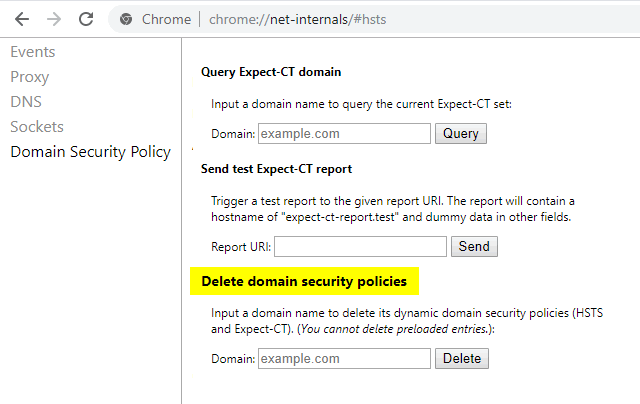
- Paste that text chrome://net-internals/#hsts to your browser's address bar;
- Submit problematic domain name to "Delete domain security policies" and click "Delete";
- Retry visiting the website.
-
Conclusion
- Webmasters: Please, stop pinning your keys!
- Visitors: Use Chrome function to remove HSTS key
-