Install an ACME SSL Certificate on cPanel
-
cPanel and Plesk hosting accounts generally support ACME SSL certificates, as long as SSH access is enabled on your hosting account. Most shared hosting accounts now include SSH access. Note for web hosts: If you are using Web Host Manager to manage the cPanel account, you’ll need to enable “Shell access” in the hosting package options.
-
-
1
Step 1: Access your SSH Terminal
The easiest way to access your SSH terminal is to:
- Log in to cPanel
- Scroll down to the Advanced section
- Click on Terminal
- Click I understand (if prompted)
You can also connect via a third-party SSH client if you prefer. Many web hosts change the SSH port from the default (22), so you’ll need to check your web host’s knowledge base for SSH access instructions.
-
2
Step 2: Install ACME.sh
Run this command to install ACME.sh (Note: unlike most ACME clients, ACME.sh is compatible with the limited SSH access available within cPanel):
curl https://get.acme.sh | sh -
3
Step 3: Register w/ACME Server
Run this command to register with the ACME server:
~/.acme.sh/acme.sh --register-account --server SERVER --eab-kid EAB_KID --eab-hmac-key EAB_HMAC_KEY
Replace these placeholders with your own values:
- SERVER = the server URL provided by the CA, eg https://acme.sectigo.com/v2/DV
- EAB_KID = EAB KID or Mac ID provided by the CA (this is the shorter string of text/numbers)
- EAB_HMAC_KEY = EAB Mac Key provided by the CA (this is the longer string of text/numbers)
If you get a “command not found error” replace ~/.acme.sh/acme.sh with the full path. You can see your full path by scrolling up and looking for a line like this: “Installed to /home/yoursitenamehere/.acme.sh/acme.sh”.
-
4
Step 4: Install & Deploy the SSL Certificate
Run the following command to issue and download your SSL certificate:
~/.acme.sh/acme.sh --issue --webroot /path/to/webroot --domain yourdomain.com --deploy-hook cpanel_uapi --server SERVER --eab-kid EAB_KID --eab-hmac-key EAB_HMAC_KEY
Replace these placeholders with your own values:
- SERVER = the server URL provided by the CA, eg https://acme.sectigo.com/v2/DV
- EAB_HMAC_KEY = EAB Mac Key provided by the CA (this is the longer string of text/numbers)
- yourdomain.com = your full domain, eg mydomain.com. If you want to install the certificate for www and non-www, duplicate the domain parameter, like this: --domain mydomain.com --domain www.mydomain.com
- /path/to/webroot = the path where your website homepage is stored, usually something like /home/yoursitename/public_html/. You can see your webroot path listed on the cPanel dashboard page as “Home Directory”.
Once the command successfully runs, you now have an SSL certificate issued and stored on the server. Now you just need to run this command to import the SSL certificate into cPanel:
~/.acme.sh/acme.sh --deploy --domain yourdomain.com --deploy-hook cpanel_uapi
-
5
Step 5: Confirm Setup
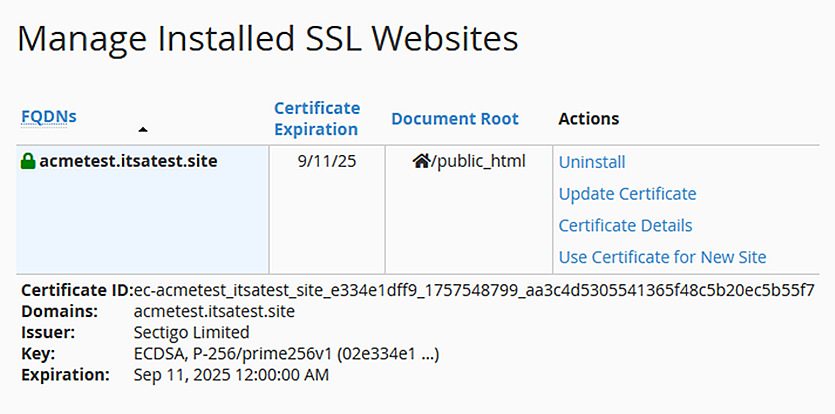
Your SSL certificate should now be visible in cPanel under SSL/TLS > Certificates and SSL/TLS > Manage SSL Sites:
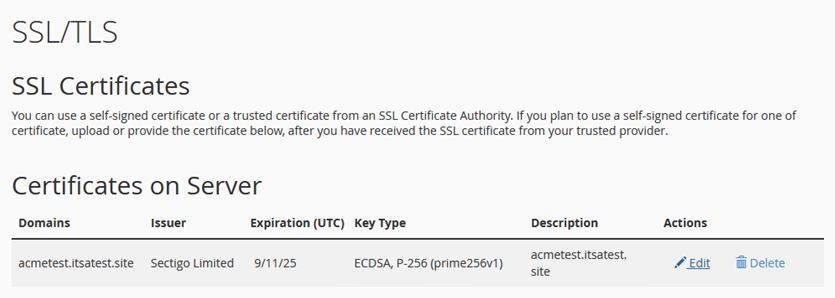
ACME.sh will automatically renew/update the SSL certificate ~30 days before it expires. It’s a good idea to test the autorenewal just to make sure your server is correctly configured for it to run. You can run this command to force a reissue and reinstall:
~/.acme.sh/acme.sh --cron --forceAfter the command successfully runs, you can verify that the certificate has been updated by checking the Certificate ID under Manage SSL Sites.
-