


What Is an S/MIME Certificate and How Does It Work?
-
Email is widely used to exchange business and personal information, but standard email does not guarantee sender authenticity or message confidentiality.
- Automatic renewals
- Less manual work
-
-
*
S/MIME stands for Secure/Multipurpose Internet Mail Extensions. It is a standard that uses public key cryptography to secure email messages.
An S/MIME certificate helps protect email communication through digital signatures and encryption. It allows recipients to verify the sender, detect message changes, and protect sensitive content from unauthorized access.
S/MIME provides two main functions:
- Digital signing: Verifies the sender's identity and helps confirm that the signed message has not been modified.
- Email encryption: Protects message contents so that only intended recipients with the corresponding private keys can decrypt them.
-
*
How Does S/MIME Work?
S/MIME uses a public and private key pair for signing and encryption. These processes serve different purposes.
Digital Email Signing
When a user sends a digitally signed email:
- The email client calculates a hash of the message.
- The sender's private key is used to create a digital signature.
- The signature and sender's certificate are attached to the message.
- The recipient's email client verifies the signature using the sender's public key and checks the message integrity.
If verification succeeds, the recipient can confirm that the signed content has not been altered since it was signed.
Email Encryption
To encrypt an email, the sender needs the recipient's public key, usually obtained from their S/MIME certificate.
The email client encrypts the message using a symmetric key and then encrypts that key with the recipient's public key. The recipient uses their private key to recover the symmetric key and decrypt the message.
Note: Signing and encryption are separate functions. A message can be digitally signed, encrypted, or both.
-
*
How to Choose the Right Product?
GoGetSSL offers S/MIME certificates from Sectigo and DigiCert, with options for individual users and organizations. The main differences are the level of identity validation, the information displayed in the certificate, and supported functions.
Sectigo S/MIME Certificates:
- Mailbox Validated Strict (MVS): A basic option for email signing and encryption. It requires email address verification and displays only the email address in the certificate.
- Mailbox Validated Multipurpose (MVM): Includes the same email-only validation and certificate details as MVS, but also supports client authentication.
- Multipurpose Organization Validated (OVS): Designed for business use. It requires email verification, individual identity verification, and organization validation. The certificate displays the email address, person's name, and company details. It also supports client authentication.
DigiCert Secure Email Certificates:
- Secure Email for Individual: Designed for personal email addresses, including Gmail, Outlook, Yahoo, and other public email services, as well as custom email domains. It requires email verification and displays only the email address in the certificate.
- Secure Email for Business: Designed for corporate email addresses. It includes the applicant's email address, name, and company name. Issuance requires domain control validation and organization verification. The organization confirms that the applicant is authorized to request the certificate.
Here are the tips, which may assist you to choose a certificate based on your intended use:
- Personal email signing and encryption: Sectigo MVS.
- Email signing, encryption, and client authentication: Sectigo MVM or DigiCert Secure Email for Individual.
- Corporate email security with organization validation: Sectigo OVS or DigiCert Secure Email for Business.
Note: _All these products support multiple email addresses on a single certificate, subject to the applicable restrictions. Sectigo allows up to 50 email addresses per order, while DigiCert allows up to 250, however, only one email address can be listed as a main one. _
-
*
What Is a P7S File?
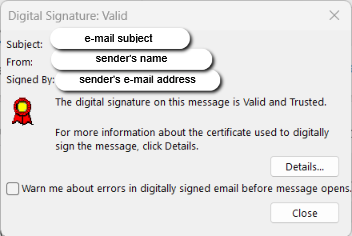
A .p7s file is commonly used to store a digital signature created according to the PKCS#7/CMS standard. In email communication, it may contain the detached S/MIME signature associated with a message.
Many modern e-mail clients, such as Microsoft Outlook, Mozilla Thunderbird, and Apple Mail, can automatically handle P7S files when you receive an e-mail with a P7S attachment. These clients will verify the signature and display the results directly within the e-mail interface, so you don't need to open the files with a digital signature manually.
If an email client cannot verify the signature, it may show a warning. This can happen if the certificate is expired, revoked, untrusted, or if the signed message has been modified.
-
*
How to Add an S/MIME Signature to Your Emails
To digitally sign emails, you need an S/MIME certificate associated with your email address and installed in your email client.
For example, in classic Microsoft Outlook:
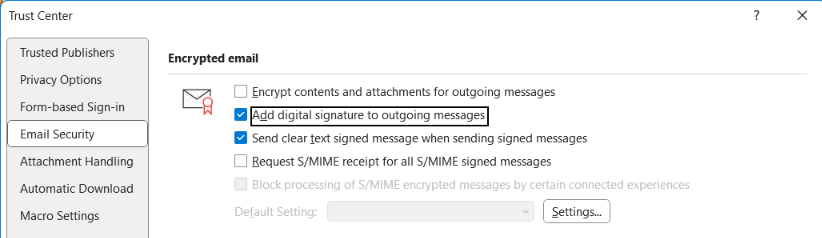
- Open File → Options.
- Select Trust Center → Trust Center Settings.
- Open Email Security.
- Under Encrypted email, select Settings.
- Choose your signing certificate and enable digital signing for outgoing messages.
Note: _The exact steps may differ in New Outlook and other email clients. _
-
