


DigiCert X9 PKI Certificates Explained
-
Banks, payment processors and clearing houses talk to each other machine to machine, and both sides must prove who they are. For years they used ordinary public TLS certificates for that. That era is ending: public certificates are losing client authentication and getting shorter lifetimes every year. DigiCert X9 PKI for TLS is the answer built for the financial industry: a separate, industry-governed trust framework made for mutual TLS (mTLS), APIs and host-to-host connections.
- Automatic renewals
- Less manual work
-
-
*
What Is X9 PKI?
X9 PKI (also called the X9 Financial PKI) is a public key infrastructure created by DigiCert together with the Accredited Standards Committee X9 (ASC X9), the body that writes technical standards for the US financial services industry. It has its own root certificate, the DigiCert X9 Financial PKI root, and its own certificate policy (the X9 CP).
The key idea: X9 PKI works independently of browser root programs. Its rules are set by the financial industry for the financial industry, not by Chrome, Apple, Mozilla or Microsoft. That gives organizations one shared trust anchor for connections between different companies, something a private, in-house PKI cannot easily offer.
- Industry-governed. Certificates are issued under the ASC X9 standards, not the CA/Browser Forum rules for websites.
- Built for machines, not browsers. It is designed for non-browser TLS and mTLS: APIs, host-to-host links, inter-bank networks and payment processing.
- Client authentication included. One certificate can prove the identity of a server and of a client.
- Verified organizations only. DigiCert validates every organization before issuance.
-
*
Why the Financial Industry Needs It Now
Public TLS certificates were designed for websites. Browser root programs keep tightening their rules, and two of those changes break the way many financial systems work:
- Client authentication is going away. Public TLS certificates are becoming server-only. DigiCert stopped adding the Client Authentication EKU (extended key usage) by default on October 1, 2025, and from March 2027 new public TLS certificates cannot contain it at all. Without it, a certificate cannot identify the client side of an mTLS connection.
- Lifetimes keep shrinking. Since March 15, 2026 a public TLS certificate is valid for at most 200 days. The limit drops to 100 days in March 2027 and to 47 days in March 2029. Frequent replacement is easy on a web server with ACME, but hard on a mainframe link, an HSM-backed gateway or a partner connection that needs change control.
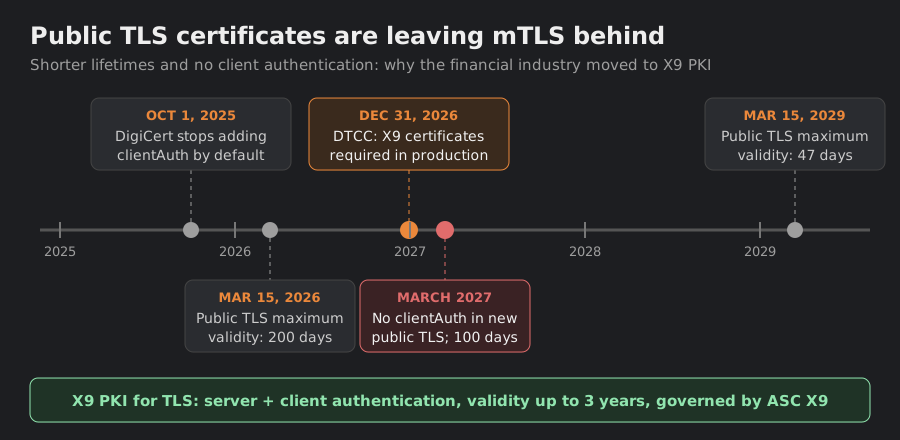
Certificates that already contain the Client Authentication EKU stay valid until they expire, so nothing breaks overnight. But every renewal after the cut-off produces a certificate that can no longer authenticate a client. Planning the move to X9 PKI before that point avoids failed connections.
-
*
Web PKI vs X9 PKI: Two Trust Worlds
X9 certificates use the same TLS protocol as any website certificate. What differs is who trusts them and why. A public certificate is trusted because its root ships inside every browser and operating system. An X9 certificate is trusted because the organizations that exchange data agree to install the X9 root in their own trust stores.
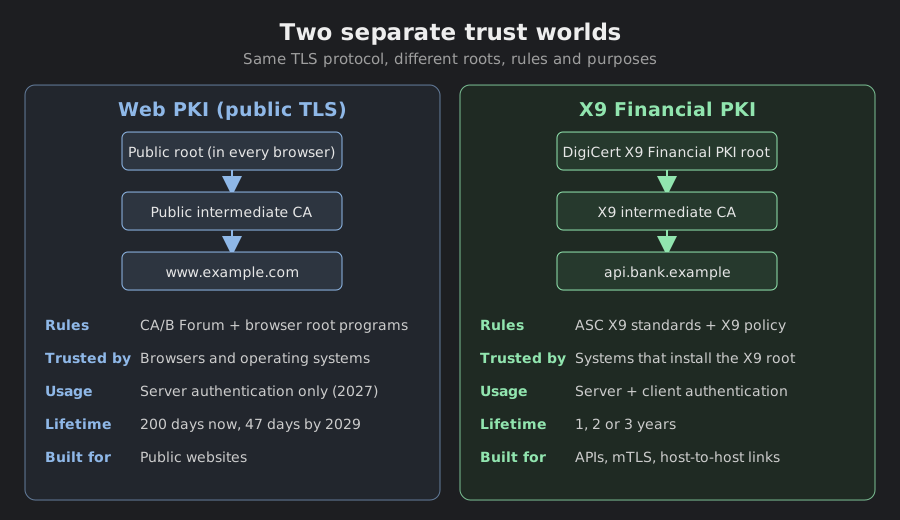
Feature Public TLS (Web PKI) X9 PKI for TLS Private (in-house) PKI Who sets the rules CA/Browser Forum and browser root programs ASC X9 and the X9 certificate policy Your own organization Trusted out of the box by Browsers and operating systems Systems that install the X9 root Only systems you configure Client authentication (mTLS) Removed from new certificates in 2027 Yes, together with server authentication Yes Maximum validity 200 days, falling to 47 days by 2029 Up to 3 years Your choice Trust between companies Yes, but server authentication only Yes, one shared industry trust anchor Hard: every partner must trust your private root Identity checks DV, OV or EV Organization validation by DigiCert No independent checks Best for Public websites Financial APIs, mTLS, host-to-host Internal systems -
*
How Mutual TLS Works with X9 Certificates
In a normal HTTPS connection only the server shows a certificate. In mutual TLS both sides do: the server proves it is the real partner API, and the client proves it is an authorized bank, processor or member. Each side checks the other's certificate chain against the X9 root in its trust store.
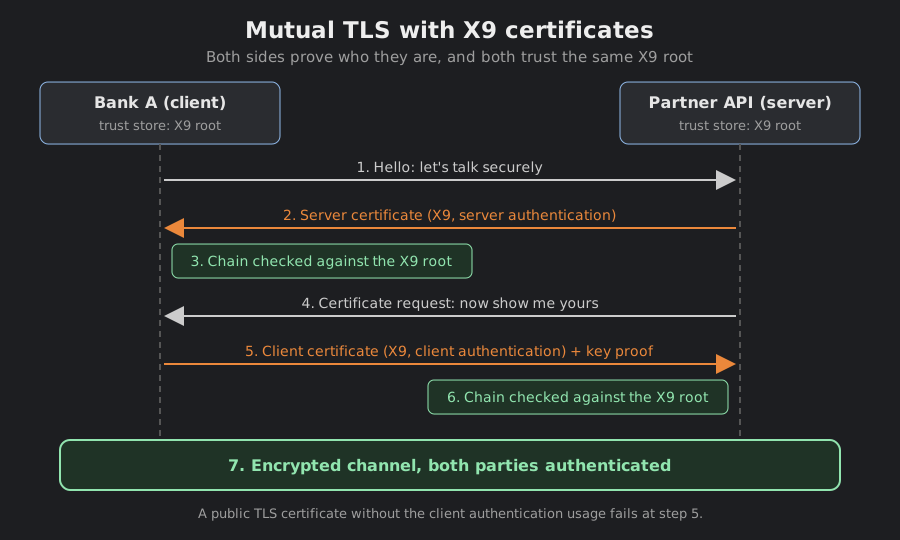
Because X9 certificates carry both the Server Authentication and the Client Authentication usage by default, the same certificate type covers both roles. You can also request a server-only or client-only certificate if your security policy prefers to keep the roles apart.
-
*
Who Uses X9 Certificates
X9 PKI fits any system where two organizations exchange financial data over TLS and need strong, long-lived identities on both ends:
- Open banking and partner APIs. REST and SOAP APIs where only known, verified clients may connect.
- Host-to-host connections. File transfers and message queues between banks, processors and clearing houses.
- Inter-bank networks. Private links where both sides authenticate each other with certificates.
- Payment processing. Gateways and processors that accept connections only from authenticated merchants and acquirers.
A real-world example: the Depository Trust and Clearing Corporation (DTCC) requires participants to use X9 PKI for TLS certificates on IBM MQ, Connect:Direct (NDM) and FTPS connections. The deadlines are November 30, 2026 for the test environment (UAT) and December 31, 2026 for production. For DTCC's insurance REST and SOAP APIs, clients only need to add the X9 root and intermediate certificates to their trust stores (by February 28, 2027 for UAT and March 31, 2027 for production); they do not need to present an X9 client certificate. Details are in DigiCert's guide for DTCC users.
-
*
X9 PKI for TLS at a Glance
Feature DigiCert X9 PKI for TLS Validation Organization Validation (OV) under the X9 rules, plus domain control validation for every name Key usages (EKU) Server and client authentication by default; server-only or client-only on request Key types RSA 2048, 3072 or 4096 bits; ECC P-256 or P-384 (in the initial release ECC certificates are issued from an RSA intermediate) Names per certificate Up to 250 fully qualified domain names and IP addresses Wildcards Not supported Validity 1, 2 or 3 years Reissues Free reissues and duplicates for the life of the certificate Warranty $1,250,000 Trust anchor DigiCert X9 Financial PKI root (not included in browser trust stores) Domain control can be proved with DNS TXT or CNAME records, by email, or with an HTTP file. IP addresses can only be validated with the HTTP method. To learn more about key algorithms, see ECC, RSA, and SHA in SSL Certificates; for company checks, see Business Validation SSL.
-
*
When Not to Use X9 PKI
Important: X9 certificates are not trusted by web browsers. If you install one on a public website, visitors will see a security warning. For browser-facing sites, use a regular publicly trusted certificate such as DigiCert Secure Site.
A common setup is to run both side by side: a public certificate on the website and customer portal, and X9 certificates on the APIs and back-end links that partners connect to.
-
*
How to Get an X9 Certificate with GoGetSSL
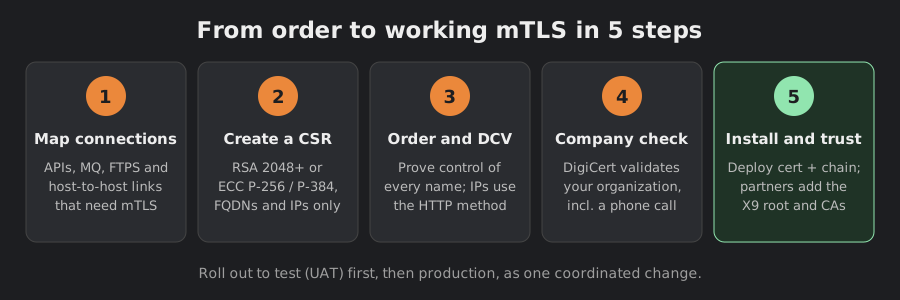
- Map your connections. List every API, message queue, FTPS and host-to-host link that uses mTLS, with the domain names and IP addresses each certificate must cover.
- Create a CSR. Use an RSA key of at least 2048 bits or an ECC P-256 / P-384 key. Only fully qualified domain names and IP addresses are allowed.
- Order and complete DCV. Order DigiCert X9 PKI for TLS, choose the key usages you need and prove control of every name.
- Pass organization validation. DigiCert verifies your company and calls its publicly listed phone number. Answer the call (or return the verification code left in a message) to avoid delays.
- Install and trust. Install the certificate with its full chain, and make sure every partner system has the current X9 root and intermediate certificates in its trust store. Test in UAT first, then switch production in one coordinated change.
Tip: Avoid certificate pinning on X9 connections. Pinned certificates break at every renewal or reissue; trusting the X9 root and intermediates is enough.
-
-
-
?
FAQ (quick answers)
- Is an X9 certificate a private certificate?
Not exactly. It is not trusted by browsers, but it is not a self-run private PKI either. DigiCert issues it under shared industry rules, so any organization that trusts the X9 root can verify it. - Will my current mTLS certificates stop working?
No. Public TLS certificates that already contain the Client Authentication usage stay valid until they expire. Problems start when you renew after the cut-off and the new certificate no longer has it. - Can I use an X9 certificate on my website?
No. Browsers do not trust the X9 root, so visitors would see a warning. Use a public SSL certificate for websites. - Does X9 support wildcard certificates?
No. Each certificate lists fully qualified domain names and IP addresses, up to 250 in total. - Do my partners need to do anything?
Yes. Every system that checks your certificate must have the X9 root and intermediate certificates in its trust store. DigiCert offers them as a free download.
- Is an X9 certificate a private certificate?
-
