


VMC vs CMC Certificates: Differences, Benefits, and How They Work
-
Verified Mark Certificates (VMCs) and Common Mark Certificates (CMCs) allow eligible organizations to display their brand logos in supported email clients through Brand Indicators for Message Identification (BIMI). The main difference is how the logo qualifies for certification and whether Gmail displays a verified blue checkmark.
-
-
*
VMC vs CMC: What's the Difference?
Feature VMC (Verified Mark Certificate) CMC (Common Mark Certificate) Trademark requirements A qualifying registered trademark or eligible government mark A logo with qualifying prior use or one that meets DigiCert's modified registered trademark rules Gmail logo display Logo with a blue checkmark Logo without the VMC blue checkmark Best suited for Organizations with a qualifying registered mark Organizations whose logos qualify through prior use or modified trademark rules -
*
How Do VMC and CMC Work?
BIMI allows a sending domain to publish information about its brand logo in DNS. When the domain meets the relevant authentication and provider requirements, a supported email client may display that logo alongside messages from the domain.
A typical BIMI setup includes:
- DMARC: The sending domain must publish a DMARC record with an enforcement policy of p=quarantine or p=reject.
- A compliant logo: The logo must meet the BIMI SVG Tiny Portable/Secure (SVG Tiny PS) requirements.
- A BIMI DNS record: The record points to the logo and, where required, the certificate.
- Email authentication: SPF and DKIM should be configured appropriately, with DMARC alignment.
BIMI does not guarantee that a logo will appear in every inbox. Display depends on the email provider's support and requirements.
-
*
How Do They Look in Gmail?
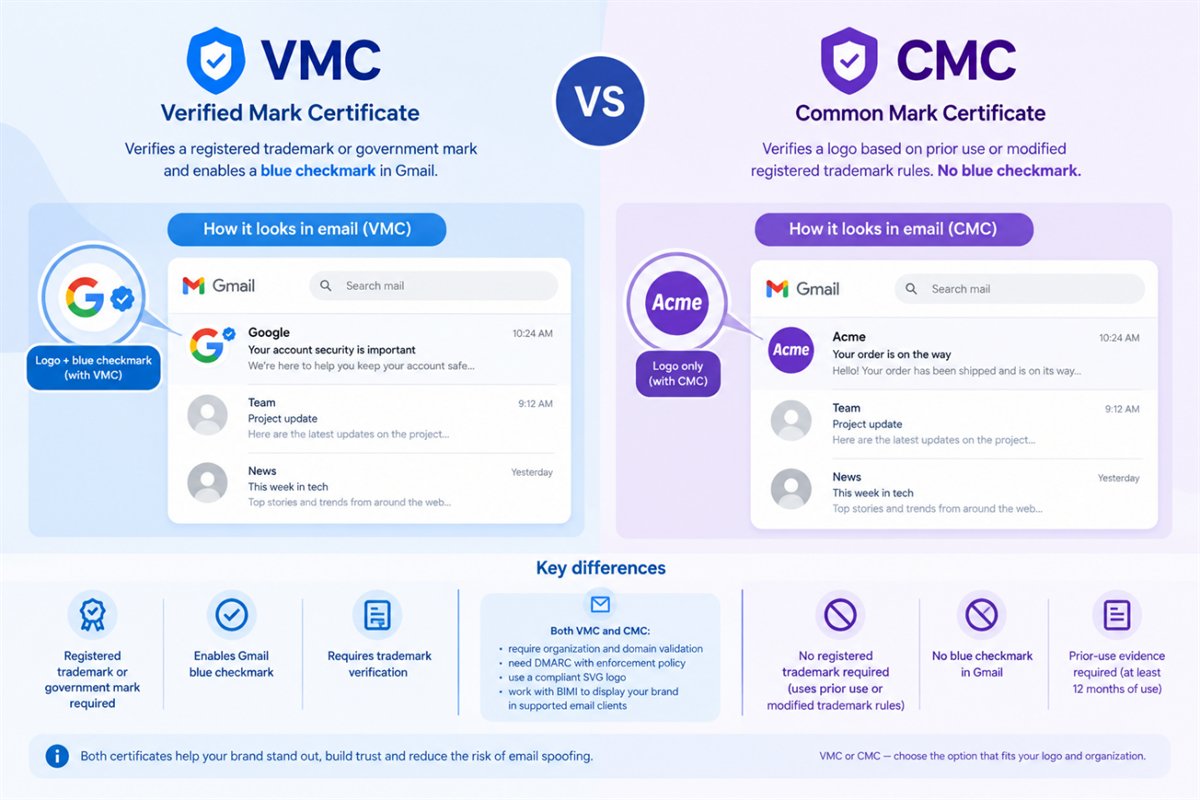
The main visual difference is the blue checkmark associated with VMCs.
- VMC: Gmail can display the brand logo with a blue checkmark indicating that the mark has been verified.
- CMC: Gmail can display the brand logo, but without the VMC blue checkmark.
CMC support in Gmail does not mean the two certificates provide identical visual indicators. The blue checkmark is associated with VMCs.
-
*
VMC and CMC Validation Checklist
Before submitting an order, make sure you have the following:
- An organization that can complete the required Extended Validation (EV)-level checks.
- Control over the domain used for sending email.
- A published DMARC record with an enforcement policy of p=quarantine or p=reject.
- An SVG logo that complies with the BIMI SVG Tiny Portable/Secure (SVG Tiny PS) profile.
- For a VMC, the registration details of the qualifying trademark or government mark.
- For a CMC, evidence that the logo has been used for at least 12 months, or documentation showing that it qualifies under DigiCert's modified registered trademark rules.
- An authorized individual who can complete the required identity verification and organizational approval.
The exact documentation requested may vary depending on the organization and the results of the validation checks.
For a more detailed explanation of the validation process, see our VMC and CMC Certificate Validation Requirements guide.
-
*
Which Certificate Should You Choose?
Choose a VMC if your organization has a qualifying registered trademark or eligible government mark and wants the Gmail blue checkmark associated with VMCs.
Consider a CMC if your logo qualifies under DigiCert's prior-use or modified registered trademark rules and you do not require the VMC blue checkmark.
Before ordering, confirm that your logo and organization meet the applicable criteria and that the certificate covers your intended domain and logo configuration. Requirements and supported features may vary by certificate offering and email provider.
-
