


Phishing Simulation Campaigns: How to Test and Train Your Workforce
-
Even the strongest cybersecurity infrastructure can be undermined if employees do not follow secure practices.
-
-
*
People remain a critical part of cyber hygiene. Employees need to recognize suspicious messages, verify unusual requests, and follow established procedures before clicking links, opening attachments, or sharing sensitive information.
Phishing simulation campaigns help organizations test and strengthen these skills.
A phishing simulation is a controlled training exercise in which employees receive realistic but harmless phishing messages. The goal is to measure how users respond and help them recognize malicious tactics before they encounter a real attack.
Effective simulations teach employees to:
- identify suspicious emails and messages;
- avoid unsafe links and attachments;
- verify unexpected requests;
- report suspicious activity through the correct channels;
- apply secure behavior in realistic situations.
Phishing simulations should therefore be treated as an ongoing part of security awareness rather than a one-time exercise.
-
*
Types of Phishing Simulations
The most useful simulations recreate the phishing techniques employees are likely to encounter in real life.
Organizations can combine several scenarios depending on industry, employee roles, and existing security risks.
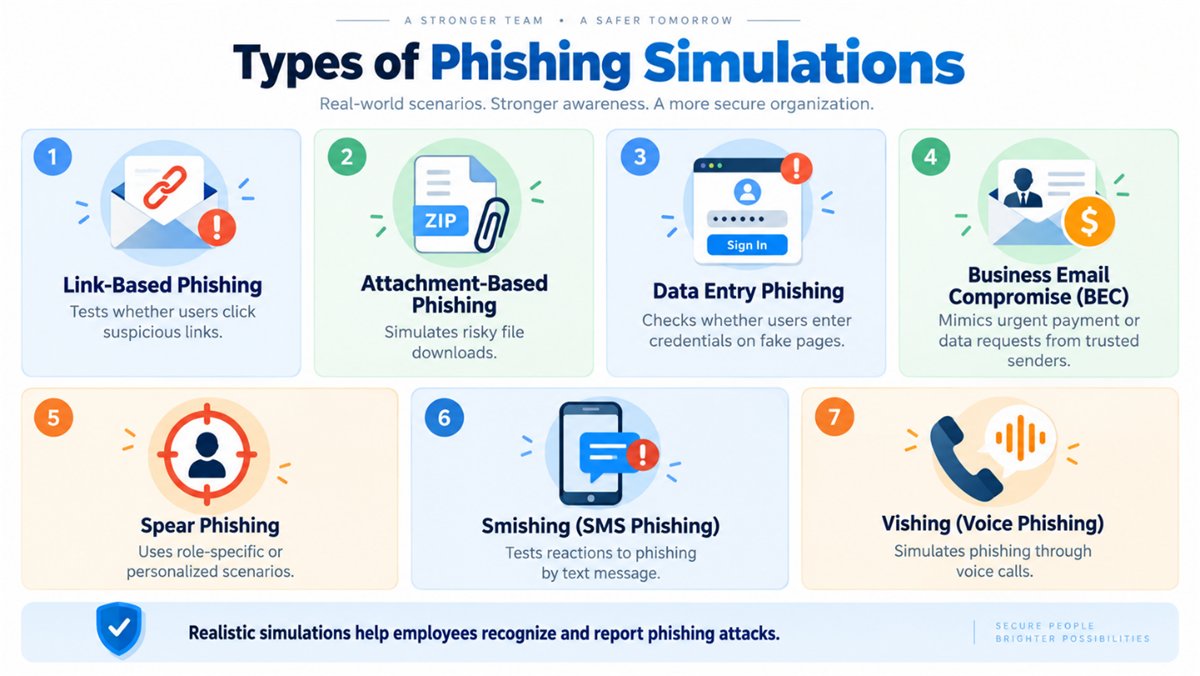
1. Link-Based Phishing
Employees receive a simulated phishing message containing a suspicious link.
The exercise measures whether users click before checking the sender, domain, destination, or context of the message.
This is one of the simplest ways to evaluate basic phishing awareness.
2. Attachment-Based Phishing
This type of simulation includes a suspicious attachment such as a Portable Document Format (PDF) file, Microsoft Word document, or ZIP archive.
The objective is to see whether employees open the attachment without verifying the sender or understanding why the file was sent.
3. Data Entry Phishing
Employees are directed to a simulated login page designed to resemble a legitimate service.
The campaign tests whether users verify the domain before entering credentials.
This technique replicates credential harvesting, one of the most common objectives of phishing attacks.
4. Business Email Compromise
Business Email Compromise (BEC) simulations imitate requests that appear to come from executives, vendors, partners, or other trusted contacts.
A scenario might involve an urgent payment request, a change in bank details, or a request to disclose sensitive business information.
These simulations are particularly useful for finance, accounting, Human Resources, and executive teams.
5. Spear Phishing
Spear phishing simulations are personalized for a particular employee, department, project, or business process.
Because the message contains relevant contextual information, it may appear much more credible than generic phishing.
These exercises help employees recognize targeted social-engineering techniques rather than relying only on obvious warning signs.
6. Smishing Simulations
Short Message Service (SMS) phishing, commonly known as smishing, uses text messages instead of email.
Employees may receive simulated messages about account verification, package deliveries, payments, or other scenarios designed to encourage them to follow a link.
Smishing exercises are particularly relevant when employees use corporate mobile devices.
7. Vishing Simulations
Voice phishing, or vishing, uses phone calls to manipulate users.
An attacker may impersonate IT support, a bank, a vendor, an executive, or another trusted contact.
Artificial Intelligence (AI)-assisted voice generation can make impersonation increasingly convincing, making vishing an important scenario to include in modern security training.
A mature phishing simulation program should use multiple scenarios rather than relying on a single campaign template.
-
*
The Ideal Phishing Simulation Campaign
A successful phishing simulation should be planned carefully, aligned with clear objectives, and measured consistently.
1. Planning the Simulation
Every campaign should begin with a specific goal.
Possible objectives include:
- reducing phishing click rates;
- increasing reporting rates;
- improving detection of Business Email Compromise;
- testing high-risk departments;
- evaluating new employees;
- measuring awareness of a particular attack technique.
Choose the type of simulation according to the risk you want to evaluate.
Campaigns can target:
- the entire organization;
- specific departments;
- executives;
- new hires;
- high-risk roles;
- employees who require additional training.
Organizations should also define exclusions, escalation procedures, and success criteria before launching a campaign.
Security, Human Resources, and Legal teams should understand the scope of the exercise, particularly when realistic scenarios involve executives, payments, or sensitive business processes.
2. Frequency of Simulation Campaigns
Simulation frequency should reflect the organization's threat profile, employee awareness levels, and operational needs.
A practical schedule might include:
- monthly or bi-monthly low-risk simulations for general awareness;
- campaigns every few weeks for higher-risk departments such as finance, IT, Human Resources, or legal;
- quarterly or biannual advanced simulations involving Business Email Compromise or multiple attack vectors;
- simulations during the first months of employee onboarding or after significant role changes.
The objective is regular reinforcement without creating excessive simulation fatigue.
3. Format and Distribution
Phishing simulations should look realistic enough to test actual behavior.
Messages should reflect the organization's communication style and common workplace scenarios rather than relying on exaggerated or obviously suspicious wording.
Organizations can also:
- distribute campaigns in waves instead of sending everything simultaneously;
- vary sending times;
- use realistic business scenarios;
- combine email with SMS or phone-based simulations;
- use multi-channel exercises where appropriate.
The closer the exercise reflects real communication habits, the more useful the results will be.
4. Monitoring Responses and Metrics
A phishing simulation should measure behavior, not simply whether someone clicked a link.
Useful metrics include:
- click-through rate;
- attachment-open rate;
- simulated credential-entry attempts;
- reporting rate;
- time to report;
- time to click;
- repeat failures;
- use of official reporting channels.
Organizations can also examine whether employees:
- checked the sender address;
- inspected a link before opening it;
- verified an unusual request;
- escalated suspicious activity.
Metrics can be analyzed by department, role, location, or risk group to identify where additional training may be needed.
Employees who interact with simulated phishing content can also receive immediate micro-training, such as a short explanation or quiz showing which warning signs they missed.
-
*
Interpreting Simulation Results
Running a campaign is only the first step. The real value comes from analyzing the results and using them to improve employee behavior.
Click Rates and Downloads
Click rates provide a useful indication of how frequently users interact with simulated phishing content.
A high click or attachment-open rate may indicate that employees need additional training, but this metric should not be considered in isolation.
Reporting behavior, verification habits, and improvement over time are equally important.
Immediate Learning
One of the most effective moments for training occurs immediately after an employee interacts with a simulated phishing message.
Instead of simply showing that the user failed the exercise, explain the warning signs they missed.
These may include:
- a mismatched sender domain;
- unusual wording;
- unexpected urgency;
- suspicious links;
- an unusual request for credentials or money.
Immediate feedback connects the lesson directly to the employee's action.
Reinforce, Do Not Punish
Phishing simulations should be used to improve behavior, not embarrass employees.
A "name and shame" approach can discourage reporting and damage the organization's security culture.
Employees who repeatedly struggle with simulations should receive targeted refresher training or additional support.
The goal is to build confidence and better security habits.
Analyze Trends Over Time
A single campaign provides only a snapshot.
Repeated simulations allow organizations to identify whether employees are:
- improving;
- repeating the same mistakes;
- responding faster;
- reporting more suspicious messages;
- becoming complacent.
Long-term trend analysis provides a much better picture of organizational security awareness than one isolated campaign.
-
*
Strategic Phishing Simulation Roadmap for CISOs
For the Chief Information Security Officer (CISO) and security leadership, phishing simulations should generate actionable data.
Each campaign can help improve the broader security program.
Key priorities include:
- Treat every campaign as a source of security data. Analyze click rates, reporting times, escalation gaps, and other behavioral metrics.
- Provide immediate and personalized education when employees interact with simulated phishing.
- Use recurring and varied scenarios so employees are exposed to different types of attacks.
- Update campaign templates according to emerging phishing techniques and real incidents.
- Track improvement over time instead of focusing only on individual failures.
- Recognize employees who consistently identify and report suspicious messages.
Simulation-based training should also be supported by technical email-security controls.
Organizations should implement Sender Policy Framework (SPF), DomainKeys Identified Mail (DKIM), and Domain-based Message Authentication, Reporting, and Conformance (DMARC) to strengthen email authentication and reduce direct domain spoofing.
For organizations using Brand Indicators for Message Identification (BIMI), a Verified Mark Certificate (VMC) or Common Mark Certificate (CMC) can support authenticated brand-logo display in compatible inboxes.
These mechanisms do not replace employee training. Instead, they provide additional trust signals that complement broader anti-phishing controls.
-
*
Conclusion
The purpose of phishing simulation is not simply to reduce the number of users who click on simulated attacks.
The broader objective is to create a workforce that recognizes suspicious behavior, verifies unusual requests, and reports potential threats quickly.
Strong cybersecurity depends on three elements working together:
- technology that detects and blocks threats;
- processes that define secure behavior and incident response;
- people who understand how attackers operate and know how to react.
Phishing simulations strengthen the human element by turning cybersecurity awareness into practical experience.
When campaigns are realistic, continuous, and supported by meaningful metrics, employees can become an active part of the organization's security defenses rather than simply another source of risk.
-
