


What Is HTTP Strict Transport Security (HSTS) and How to Implement It?
-
HTTP Strict Transport Security (HSTS) is a web security policy that tells browsers to access a website only over HTTPS. It is enabled through the Strict-Transport-Security HTTP response header.
As defined in RFC 6797, it helps protect websites against man-in-the-middle (MITM) and SSL stripping attacks by preventing browsers from switching to insecure HTTP connections.
- Automatic renewals
- Less manual work
-
-
*
What Does the HSTS Header Do?
The Strict-Transport-Security header contains one required directive and two optional directives:
- max-age – Specifies how long, in seconds, the browser should enforce HTTPS for the domain.
- includeSubDomains – Extends the HSTS policy to all subdomains.
- preload – Indicates that the domain owner wants the website included in browser HSTS preload lists. It does not submit the domain automatically.
For example:
Strict-Transport-Security: max-age=31536000; includeSubDomains
This header tells the browser to use HTTPS for the domain and its subdomains for one year.
-
*
Why Should You Implement HSTS?
HSTS strengthens website security in several ways:
Prevent SSL Stripping
SSL stripping attacks attempt to downgrade an HTTPS connection to unencrypted HTTP. Once a browser has stored an HSTS policy, it automatically upgrades future HTTP requests to HTTPS.
Prevent Insecure Connections
HSTS prevents users from bypassing certificate warnings for domains covered by the policy. If a certificate is expired, invalid, or incorrectly configured, the browser blocks the connection instead of allowing users to proceed.
Protect Subdomains
The includeSubDomains directive extends HTTPS enforcement to subdomains, helping prevent insecure connections to parts of a website that might otherwise remain accessible over HTTP.
Note: HSTS does not automatically fix mixed content. HTTP resources embedded in an HTTPS page must be updated or handled separately, for example, using Content Security Policy.
-
*
How Does HSTS Work?
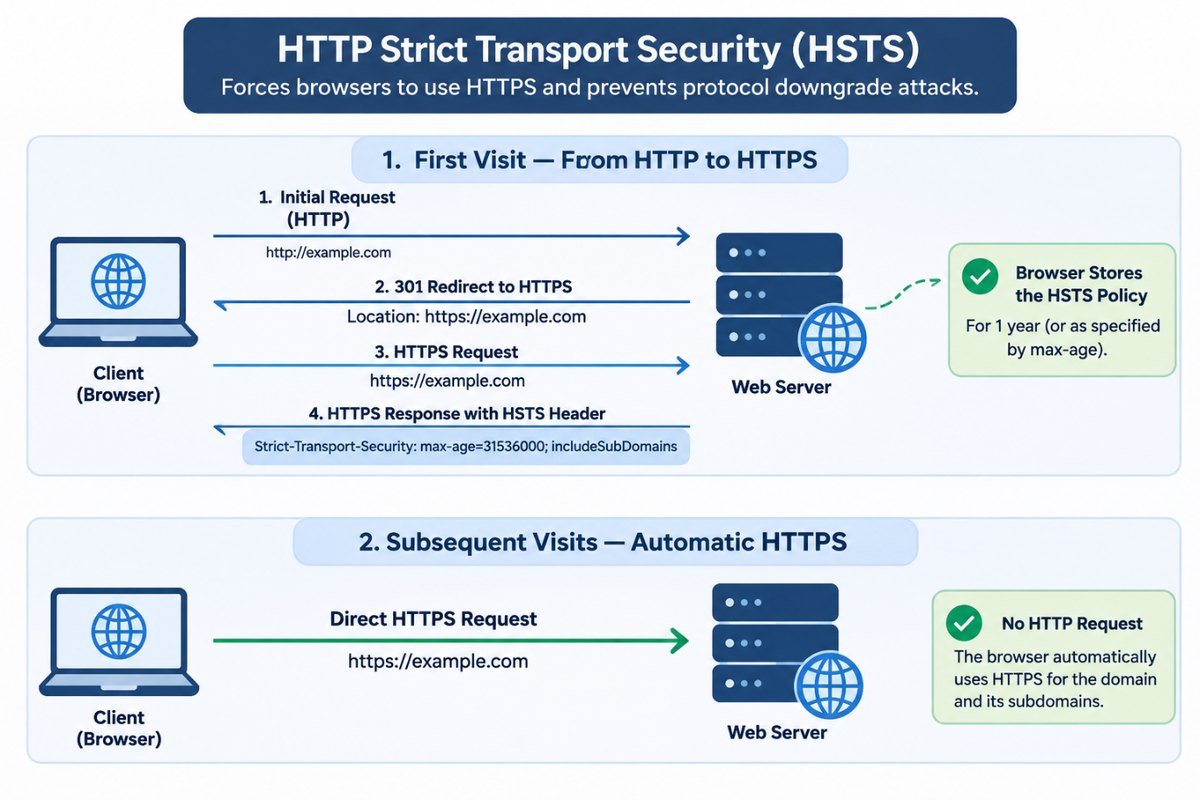
When a user visits a website for the first time, the browser may initially attempt an HTTP connection if the URL does not specify HTTPS and the domain is not already covered by an HSTS policy.
If the server redirects the request to HTTPS, the browser establishes a secure connection. The server then sends the HSTS header in its HTTPS response.
For example:
Strict-Transport-Security: max-age=31536000; includeSubDomains
The browser stores the policy and automatically upgrades future HTTP requests to HTTPS for the specified period.
If the website has a certificate error while HSTS is active, users cannot bypass the browser warning to continue to the site.
There is one limitation: HSTS does not protect the first HTTP connection before the browser has received the policy. HSTS Preloading can help address this first-visit vulnerability.
-
*
How to Implement HSTS on Your Web Server
Before enabling HSTS, make sure your website is fully configured for HTTPS.
Step 1: Configure Your Website for HTTPS
- Obtain an SSL/TLS certificate from a trusted Certificate Authority.
- Install the certificate and its corresponding private key on your web server.
- Configure HTTP-to-HTTPS redirection.
- Update internal links to use HTTPS.
- Make sure external resources, including scripts, stylesheets, and images, are loaded over HTTPS.
Check that all required subdomains also support HTTPS before enabling includeSubDomains.
Step 2: Add the HSTS Header
Start with a short max-age value, such as 300 seconds (5 minutes). This allows you to test the configuration before applying a longer policy.
Apache
Add the following directive to your Apache configuration or .htaccess file:
Header always set Strict-Transport-Security "max-age=300"
Make sure the mod_headers module is enabled.
Nginx
Add this directive inside the appropriate HTTPS server block:
add_header Strict-Transport-Security "max-age=300" always;
IIS
Add the following to the website's web.config file:
<system.webServer>
  <httpProtocol>
    <customHeaders>
      <add name="Strict-Transport-Security" value="max-age=300" />
    </customHeaders>
  </httpProtocol>
</system.webServer>
The HSTS header must be delivered over HTTPS. Browsers ignore this header when it is received over HTTP.
Step 3: Test the HSTS Configuration
After adding the header, verify that the server sends it correctly.
Using Browser Developer Tools:
- Open your website in Chrome or Firefox.
- Press F12 to open Developer Tools.
- Select the Network tab.
- Reload the page and select the main document request.
- Check the Response Headers section for Strict-Transport-Security.
You can also use the OWASP Web Security Testing Guide to check your implementation.
Test HTTP-to-HTTPS redirection and verify that all intended subdomains work correctly over HTTPS.
Step 4: Increase the max-age Value
Once testing is successful, increase max-age to a longer period, such as one year (31,536,000 seconds).
Apache
Header always set Strict-Transport-Security "max-age=31536000; includeSubDomains"
Nginx
add_header Strict-Transport-Security "max-age=31536000; includeSubDomains" always;
IIS
<system.webServer>
  <httpProtocol>
    <customHeaders>
      <add name="Strict-Transport-Security" value="max-age=31536000; includeSubDomains" />
    </customHeaders>
  </httpProtocol>
</system.webServer>
Only include includeSubDomains if every affected subdomain is ready to use HTTPS.
Step 5: Submit Your Website for HSTS Preloading
HSTS Preloading allows browsers to enforce HTTPS before a visitor's first connection to a website.
To request inclusion in the preload list:
- Make sure the main domain and all subdomains support HTTPS.
- Configure HTTP-to-HTTPS redirection on the main domain.
- Set the HSTS header with max-age of at least 31,536,000 seconds.
- Include both includeSubDomains and preload directives.
- Visit hstspreload.org and submit your domain.
A header suitable for preload submission looks like this:
Strict-Transport-Security: max-age=31536000; includeSubDomains; preload
Important: Preloading can be difficult to reverse. Make sure all subdomains, including internal ones, support HTTPS before submitting your domain.
-
*
HSTS Implementation Best Practices
Follow these recommendations to avoid configuration problems:
- Start with a short max-age: Test HSTS with a low value before increasing the duration.
- Check all subdomains: Enable includeSubDomains only when every affected subdomain supports HTTPS.
- Use a valid SSL/TLS certificate: Monitor certificate expiration and renew certificates before they expire.
- Test before preloading: Do not submit your domain until HTTPS works reliably across the entire domain.
- Monitor your configuration: Regularly check certificate validity, HTTPS redirects, and HSTS response headers.
- Keep development environments separate: Use dedicated staging and development domains to avoid applying production HSTS policies to environments that do not support HTTPS.
-
*
Common HSTS Challenges and Solutions
1. Mixed Content
Problem: Some page resources are still loaded over HTTP.
Solution: Update resource URLs to HTTPS. You can also use the Content Security Policy directive upgrade-insecure-requests to instruct browsers to upgrade insecure resource requests.
2. Expired or Invalid Certificates
Problem: Browsers block access to websites covered by HSTS when their SSL/TLS certificates are invalid or expired.
Solution: Monitor certificate expiration and renew certificates in advance. Check the certificate chain and hostname configuration as well.
3. Development and Testing Environments
Problem: HSTS can prevent access to development environments that do not support HTTPS.
Solution: Use separate domains for development and staging, and avoid enabling HSTS on them unless HTTPS is properly configured.
4. Reverse Proxy Configuration
Problem: HSTS headers may be missing or incorrectly handled when a reverse proxy sits between the browser and the web server.
Solution: Check which component is responsible for sending the HSTS header. Make sure it is included in HTTPS responses and is not duplicated or overwritten by another component.
-
*
Conclusion
HTTP Strict Transport Security (HSTS) helps protect websites against protocol downgrade and SSL stripping attacks by instructing browsers to use HTTPS for future connections.
Implementing HSTS requires a properly configured SSL/TLS certificate, reliable HTTPS support, and careful testing. Start with a short max-age, verify your website and subdomains, and increase the policy duration only when everything works correctly.
HSTS Preloading provides additional protection against first-visit downgrade attacks, but it should be enabled only when the entire domain is ready for HTTPS.
-
