


What Is SSL/TLS Certificate Pinning? How It Works and What Are the Risks?
-
SSL/TLS certificate pinning is a security technique that allows an application to trust only specific certificates or public keys when connecting to a server. It adds an extra verification step to standard TLS certificate validation.
- Automatic renewals
- Less manual work
-
-
*
Pinning is commonly used in mobile applications to reduce the risk of Man-in-the-Middle (MITM) attacks involving fraudulent certificates issued by a trusted Certificate Authority (CA) or malicious certificates installed on a device.
-
*
How Does Certificate Pinning Work?
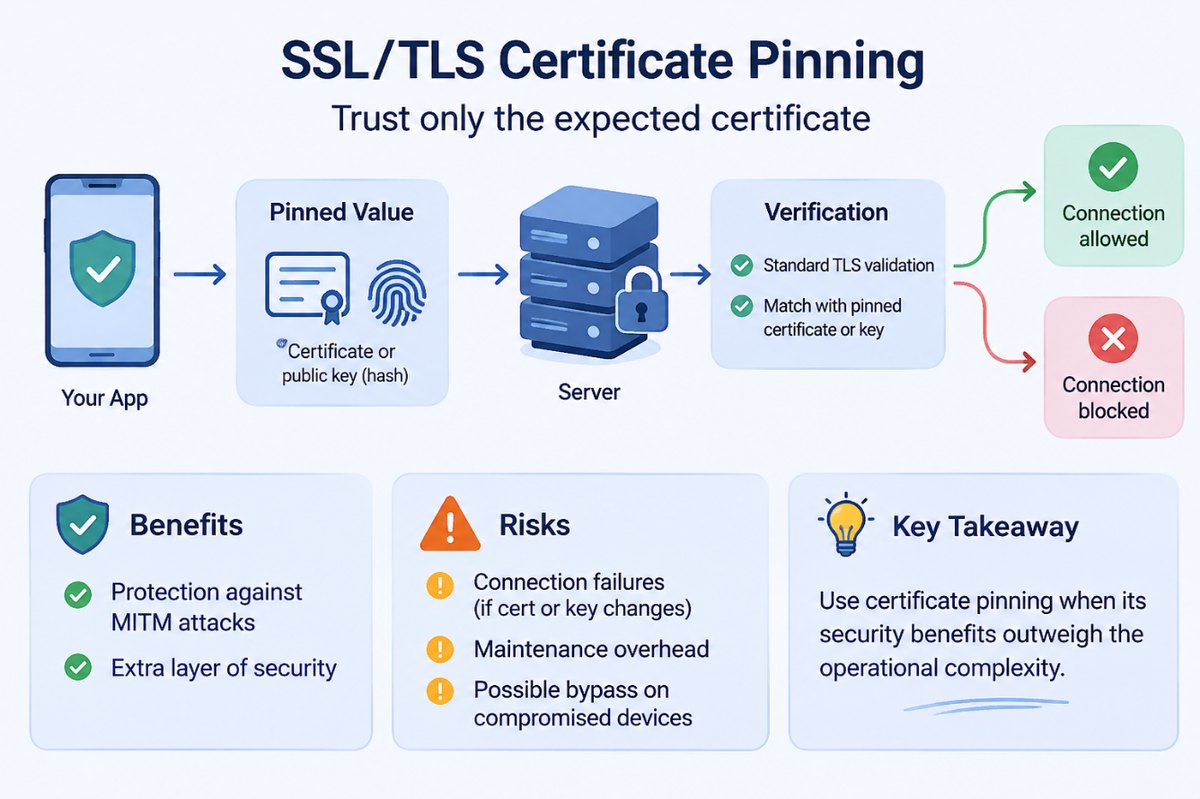
During a standard TLS connection, the client checks whether the server's certificate is valid and issued by a trusted CA. With certificate pinning, the application also compares the server's certificate or public key with a previously configured trusted value (a pin).
The process involves three steps:
- Configure the pin: The developer adds a trusted certificate or public key to the application. In many implementations, the pin is a SHA-256 hash of the certificate's Subject Public Key Info (SPKI).
- Establish a TLS connection: The server presents its certificate chain during the TLS handshake.
- Verify the pin: The application performs standard certificate validation and checks whether the certificate chain contains a matching pinned public key. If the checks fail, the connection is rejected.
Important: Pinning does not replace standard TLS validation. Both checks should be performed.
-
*
Types of Certificate Pinning
There are two common approaches:
- Certificate pinning: The application stores a specific certificate and compares it with the certificate presented by the server. If the certificate is renewed or replaced, the pin may need to be updated.
- Public key pinning: The application stores a public key or its hash, commonly an SPKI SHA-256 hash. This allows the certificate to be renewed without changing the pin, provided the same key pair is retained.
Public key pinning can make certificate renewal easier, but key rotation still requires updating the pins.
-
*
Benefits and Risks of Certificate Pinning
Certificate pinning can provide additional protection against certain MITM attacks, including attacks involving compromised or maliciously trusted CAs. However, it also introduces operational risks.
Benefits:
- Restricts an application to specific server identities.
- Reduces the risk of accepting fraudulent certificates issued by otherwise trusted CAs.
- Adds an extra layer of protection for sensitive application-to-server communication.
Risks and limitations:
- Connection failures: If a certificate, public key, or CA changes unexpectedly, the application may reject legitimate connections.
- Maintenance overhead: Pins must be managed and updated as part of the certificate and key lifecycle.
- Limited protection on compromised devices: An attacker who controls a device or can modify the application may be able to bypass pinning checks.
To reduce the risk of outages, developers should include backup pins, plan key rotation in advance, and test certificate changes before deployment.
-
*
Should You Use Certificate Pinning?
Certificate pinning is not necessary for every website or application. For most public-facing services, standard TLS validation and the browser's built-in trust mechanisms are sufficient.
Pinning may be appropriate for native mobile applications when the organization controls both the application and the server, has a specific threat model that justifies the additional protection, and can securely manage pin updates.
Do not confuse application-level certificate pinning with HTTP Public Key Pinning (HPKP). HPKP was a browser-based HTTP header mechanism that has been deprecated because of its risk of making websites inaccessible after pinning errors. It is not recommended for modern websites.
-
*
Conclusion
SSL/TLS certificate pinning adds an extra identity check to standard certificate validation by restricting which certificates or public keys an application accepts. It can help protect mobile applications against certain MITM attacks, but it also creates additional maintenance requirements and the risk of connection failures.
Use pinning only when its security benefits justify the operational complexity. If implemented, include backup pins, plan key rotation, and maintain a reliable application update process.
-
