


Code Signing Without a Hardware Token: Is It Possible?
-
Modern Code Signing Certificates require strong protection for the private signing key.
Starting June 1st, 2023, Organization Validation (OV) and Extended Validation (EV) Code Signing Certificates require the Private keys to be generated and protected in an approved Hardware Crypto Module, such as a compliant hardware token, Hardware Security Module (HSM), cloud HSM, or approved remote signing service.
This means you can use Code Signing without managing a physical USB token, but not without hardware-backed protection for the private key.
This guide explains how Code Signing works, why hardware-backed key storage is required, and which options are available for developers and organizations.
-
-
*
Code Signing Certificates and Hardware Key Protection
A Code Signing Certificate allows software publishers to digitally sign applications, executables, scripts, drivers, and other software.
The signature allows users and operating systems to verify:
- who published the software;
- whether the signed code has been modified;
- whether the signing certificate is trusted and valid.
Standard/OV and EV Code Signing Certificates differ mainly in the level of identity validation performed before issuance. Both, however, are subject to modern private-key protection requirements.
A hardware token is one way to meet these requirements. It is a physical cryptographic device, usually connected through USB, that generates and protects the signing key.
However, it is not the only option.
Private keys can also be protected using a compliant HSM or cloud-based signing environment.
Here you will find the actual Code Signing hardware and HSM requirements.
-
*
How Does Code Signing Work?
The signing process is fundamentally the same whether the private key is stored on a USB token, enterprise HSM, or compliant cloud signing platform.
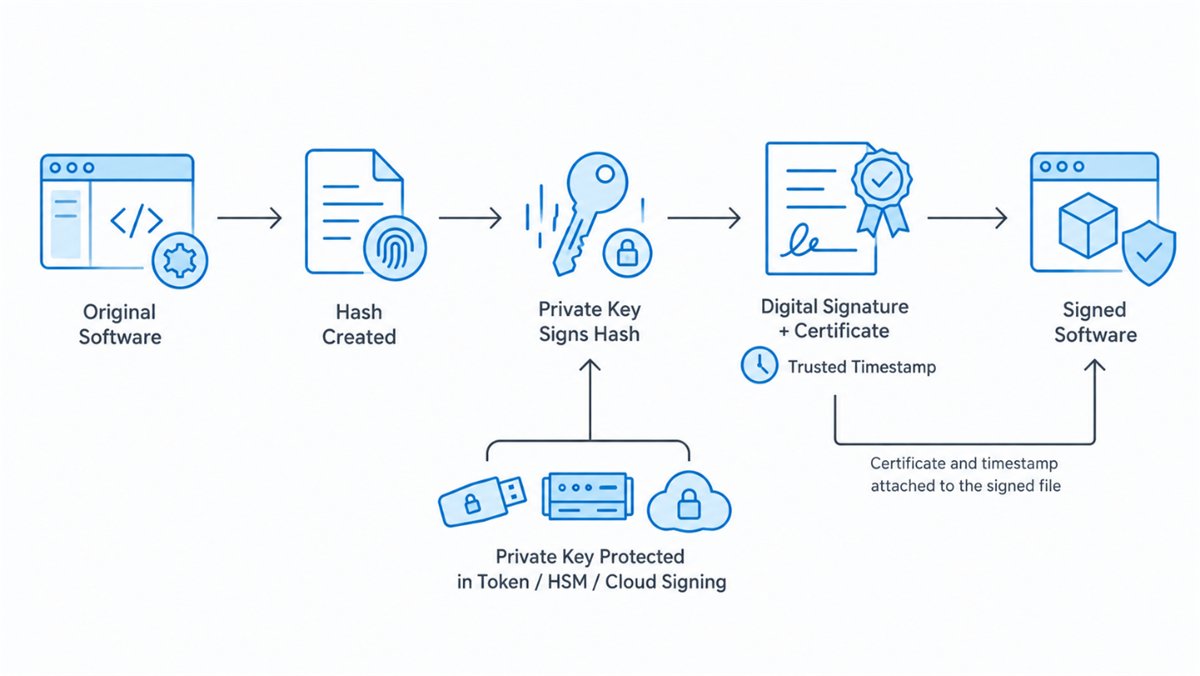
Step 1: Generate a Hash
The signing software calculates a cryptographic hash of the application or file.
The hash acts as a unique fingerprint of the software and allows later modifications to be detected.
Step 2: Create the Digital Signature
The protected private key is used to sign the hash.
The private key remains inside the hardware-backed environment and should not be exported to the developer's workstation.
A trusted timestamp can also be added during signing. Timestamping records when the signature was created and can allow a valid signature to remain verifiable after the Code Signing Certificate expires.
Step 3: Distribute the Software
The signed application can then be distributed through a website, software repository, update system, or another delivery channel.
The digital signature and certificate information remain associated with the signed file.
Step 4: Verify the Signature
When the software is downloaded or executed, the user's system can verify:
- the digital signature;
- the integrity of the signed file;
- the certificate chain;
- the identity of the publisher.
If the software has been modified after signing, the signature verification will no longer match.
-
*
Why Is Hardware-Backed Key Protection Required?
A Code Signing private key represents the publisher's digital identity.
If attackers steal that key, they may be able to sign malicious software so that it appears to originate from a legitimate organization.
Hardware-backed key storage helps reduce this risk by keeping the private key inside a protected cryptographic environment.
Depending on the solution, this can provide:
- non-exportable private keys;
- protection against key extraction;
- controlled access to signing operations;
- Multi-Factor Authentication (MFA);
- audit logs;
- separation between signing keys and ordinary development systems.
The requirement applies to both EV and standard/OV publicly trusted Code Signing Certificates.
-
*
Can You Use Code Signing Without a Hardware Token?
Yes, if by hardware token you mean a physical USB device.
You do not necessarily need a USB token to use a publicly trusted Code Signing Certificate.
There are several compliant approaches.
1. Physical Hardware Token provided by the vendor
The Certificate Authority can provide a supported USB token containing the private signing key.
This option is suitable for developers who sign locally and prefer direct possession of the signing device.
GoGetSSL currently offers token-based Code Signing products from Sectigo and DigiCert.
2. Your Own HSM or Supported Hardware
Organizations with existing cryptographic infrastructure may generate and protect the signing key within a supported HSM or token.
The Certificate Authority must be able to verify that the private key was generated and remains protected inside compliant hardware, for example through key attestation or another approved verification method.
Supported hardware security modules for Sectigo Code Signing products:
• Luna Network Attached HSM, Version 7.x
• Luna Cloud HSM
• YubiKey 5 FIPS Series
• Google Cloud KMS
• Fortanix
For DigiCert/GoGetSSL Code Signing orders:
• SafeNet eToken 5110 FIPS (ECC ONLY)
• SafeNet eToken 5110 CC (RSA 4096 and ECC)
• SafeNet eToken 5110+ FIPS
As well as a physical or cloud hardware security module (HSM), which must be FIPS 140 Level 2, Common Criteria EAL 4+, or equivalent.
3. Cloud Code Signing
Cloud signing removes the need to manage a physical token locally.
The private key remains inside a compliant hardware-backed environment operated by the signing service, while authorized users connect remotely to perform signing operations.
This approach is useful for:
- distributed development teams;
- remote developers;
- automated build environments;
- CI/CD pipelines;
- organizations that do not want to manage physical tokens or their own HSM infrastructure.
GoGetSSL offers Cloud Code Signing with Business Validation and EV Cloud Code Signing, powered by DigiCert.
-
*
Hardware Token vs. HSM vs. Cloud Signing
The best option depends on how your organization signs software.
Option Best Suited For Main Advantage Hardware token Individual developers and local signing Simple physical control HSM Enterprises and centralized infrastructure Centralized key management and scalability Cloud signing Distributed teams and automated workflows No physical token management A hardware token can be convenient for occasional local signing.
An HSM is better suited to organizations that need centralized access, multiple authorized users, or higher signing volumes.
Cloud signing provides many of the benefits of centralized HSM-based security without requiring the organization to deploy and maintain its own hardware.
-
*
OV vs. EV Code Signing: Does Key Storage Differ?
Today, the basic hardware-protection requirement applies to both.
Standard/OV and EV Code Signing Certificates must protect subscriber private keys using compliant hardware-backed mechanisms.
The main difference between the certificate types is therefore not whether the private key needs secure hardware storage, but the validation process and the level of identity verification performed by the Certificate Authority.
Organizations and individual entrepreneurs can compare available OV and EV options on the GoGetSSL Code Signing Certificates page.
-
*
Which Code Signing Option Should You Choose?
For developers who sign software occasionally from a single workstation, a hardware token may be the simplest choice.
Organizations with centralized cryptographic infrastructure may prefer an HSM.
For distributed teams, remote developers, or automated CI/CD workflows, cloud-based Code Signing can provide a more convenient approach while keeping the private key protected inside compliant cryptographic hardware.
GoGetSSL currently provides:
- OV Code Signing certificates;
- EV Code Signing certificates;
- Cloud Code Signing;
- EV Cloud Code Signing.
Instead of relying on fixed prices in this article, check the current Code Signing products and pricing directly on GoGetSSL.
-
*
Conclusion
Modern Code Signing no longer separates EV and standard/OV certificates when it comes to basic private-key protection: both require hardware-backed storage.
What has changed is the way organizations can meet that requirement.
A physical USB token remains a practical option, but developers can also use enterprise HSM infrastructure or compliant cloud signing services. This makes secure Code Signing easier to integrate into remote teams and automated software-release workflows.
The right choice depends on whether you need local signing, centralized key management, or cloud-based access. Regardless of the approach, the private signing key should remain protected inside an approved cryptographic environment throughout its lifecycle.
-
